
Anatomy of a Kafka Consumer Lag Incident
The page came in at 3:07 a.m.: consumer-lag > 2M for 10m on one of our highest-volume topics. By the time I had a laptop open, lag was at 6 million and climbing roughly linearly. Downstream, a search index was falling behind real time — users would start seeing stale results within the hour.
This is the story of that incident: how we found the root cause, why our first three hypotheses were wrong, and the guardrails that turned a recurring class of pages into a non-event.
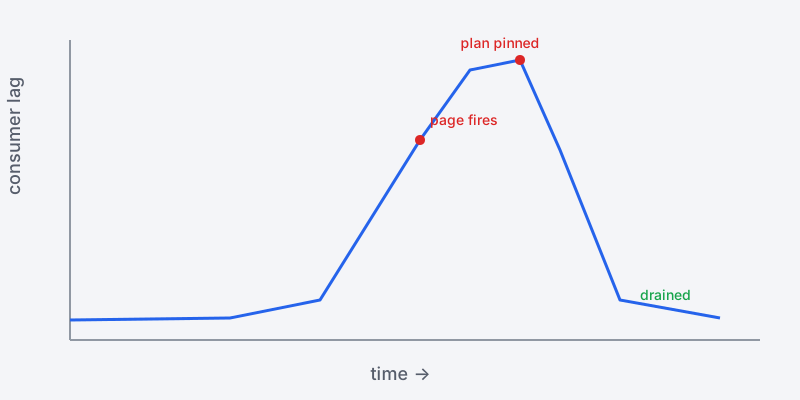
The shape of the incident: lag climbs linearly, the page fires, and lag drains within minutes once the root cause is addressed.
The symptom is never the problem
Consumer lag is a symptom. It tells you consumers aren’t keeping up with producers, but it says nothing about why. The why is almost always one of:
- Producers got faster — a traffic spike or a backfill flooding the topic.
- Consumers got slower — a code regression, a slow downstream dependency, GC pauses.
- Consumers stopped — crashes, rebalancing storms, partitions stuck without an owner.
The discipline is to rule these out in order of cheapest to check, not in order of what you suspect.
Ruling out the obvious
First check: producer rate. Our dashboards showed inbound message rate flat — no spike. So this wasn’t a load problem. (Hypothesis one, wrong.)
Second check: consumer health. All pods were Running, no recent restarts, CPU and memory nominal. So consumers hadn’t crashed. (Hypothesis two, wrong.)
Third check: rebalancing. The consumer group’s rebalance rate was zero. No churn. (Hypothesis three, wrong.)
At this point the easy explanations were gone. Producers were steady, consumers were alive and not thrashing — yet lag was growing. That can only mean one thing: per-message processing time had increased.
Following the latency
I pulled up the consumer’s processing-time histogram. p50 was normal. p99 had jumped from 8ms to over 400ms about twenty minutes before the page. Something in the processing path had gotten dramatically slower for a subset of messages.
The consumer enriched each event with a lookup against a secondary store. I checked that store’s latency: p99 on the lookup had spiked at exactly the same time. The root cause wasn’t in Kafka at all — it was a degraded index on the lookup database after an automated stats job had invalidated a query plan. The planner had switched to a sequential scan for a hot query.
producer rate:      flat        ✓ not a load spike
consumer liveness:  healthy     ✓ not a crash
rebalance rate:     0           ✓ not churn
processing p99:     8ms → 400ms ✗ ROOT CAUSE
  └─ downstream lookup p99 spiked at same timestamp
       └─ query plan regression after stats refresh
The fix, and the real fix
The immediate fix was to pin the query plan and force a re-analyze, which dropped lookup p99 back to baseline. Consumers caught up within fifteen minutes and lag drained to zero.
The real fix is never the thing that resolves the incident — it’s the thing that prevents the next one. We added three guardrails:
- Alert on the leading indicator, not the trailing one. Lag is trailing; by the time it fires you’re already behind. We added an alert on consumer processing-time p99, which would have paged us before lag accumulated.
- Make the downstream dependency a first-class SLI. The lookup store’s latency now appears on the same dashboard as the consumer, so the correlation is visible at a glance instead of requiring archaeology at 3 a.m.
- Bound the blast radius. We added a per-message processing timeout and a small bounded retry, so a slow dependency degrades throughput gracefully instead of letting individual messages stall a partition indefinitely.
What this incident taught me
The thing I keep relearning is that lag is a window, not a wall. A growing-but-bounded lag with healthy consumers is recoverable; you have time. Panic-scaling consumers when the bottleneck is downstream just moves more load onto the thing that’s already struggling — and I’ve watched that turn a recoverable incident into an outage.
Debugging distributed systems under pressure is mostly about resisting the urge to act on your first hypothesis. Check the cheap things first, follow the latency, and let the data — not your intuition — tell you where the problem actually lives.